Caregiver Missed Punches: How to Fix Time Records Before Payroll
Quick-read version · 1 minA missed caregiver punch is easier to fix when the agency can still see the visit around it.
Home health and home care teams deal with schedule changes, client homes, office stops, travel between visits, and corrections that may arrive after the shift. A missing clock-in or clock-out should not turn into a guessing exercise before payroll.
Start with the visit, not just the missing time
When a caregiver forgets to clock in or out, the office needs more than a corrected timestamp.
The useful review asks:
- Which caregiver was working?
- Which client, visit, job, or location was affected?
- What time did the visit actually start or end?
- Was there travel, mileage, an office stop, or a schedule change around the missing punch?
- Who corrected the record?
- Why was the correction made?
- Who approved the final time before payroll?
That does not mean the process should be harsh. It means the agency should have enough context to fix the record fairly for the caregiver and clearly for the business.
For the full payroll-ready workflow, read how to track employee hours for payroll. For the general correction process, read how to handle missed punches before payroll.
Keep the correction reason attached
The correction reason is what keeps a missed punch from becoming a mystery later.
A good reason is short and concrete:
- Forgot to clock out after the 2 PM visit.
- Client visit ran late and clock-out was entered after leaving.
- Schedule changed and the caregiver was reassigned to another client.
- Phone signal failed at the client home.
- Office corrected the clock-out after caregiver confirmation.
The reason should stay with the original time record, corrected time, reviewer, and approval. If those details live in separate texts, sticky notes, or spreadsheets, the office has to rebuild the story every time there is a payroll question.
The edit-request demo below shows the correction side of this workflow: the original record, the requested change, the reason, and review status stay together before payroll.
No login required. Opens in one click.
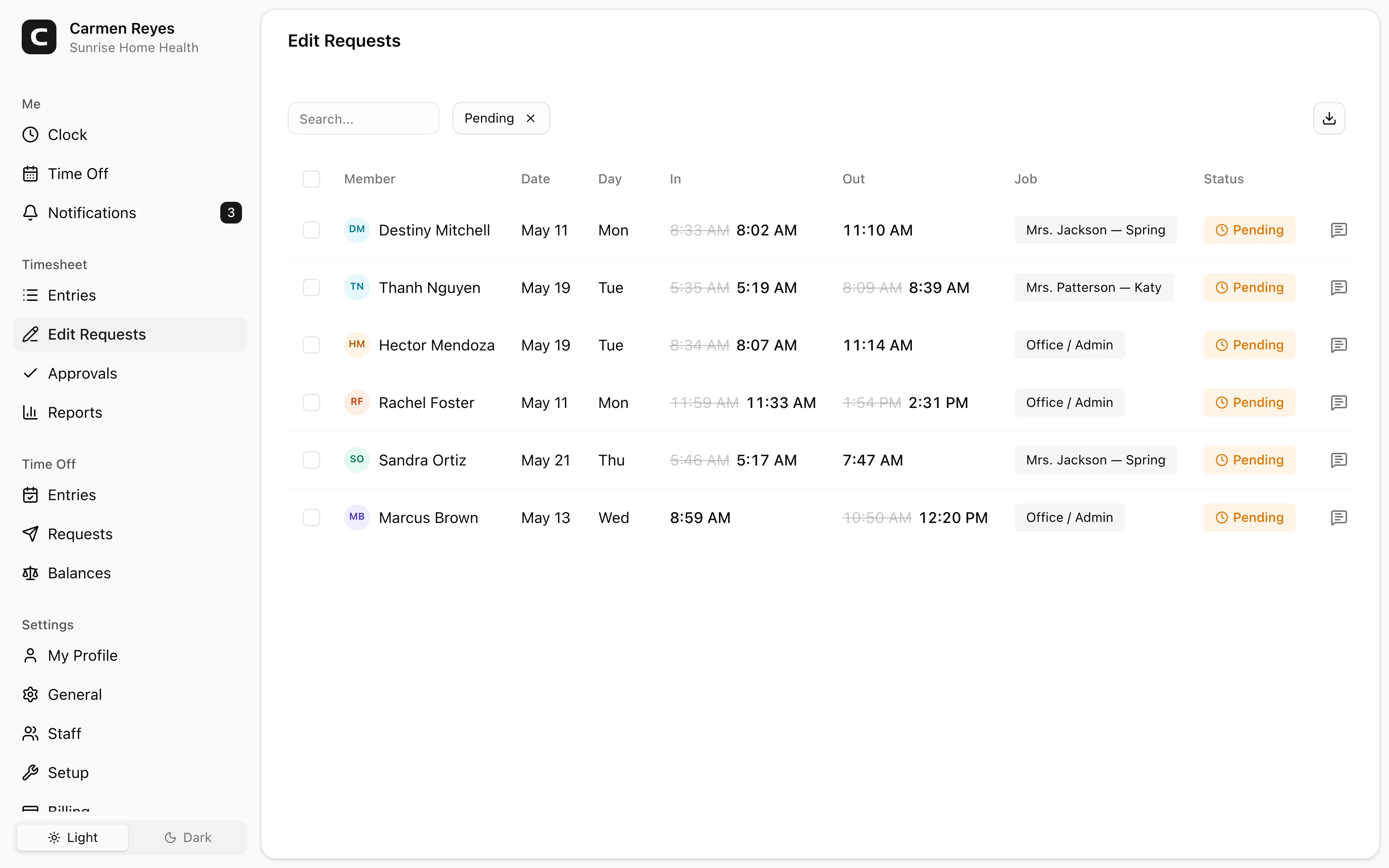
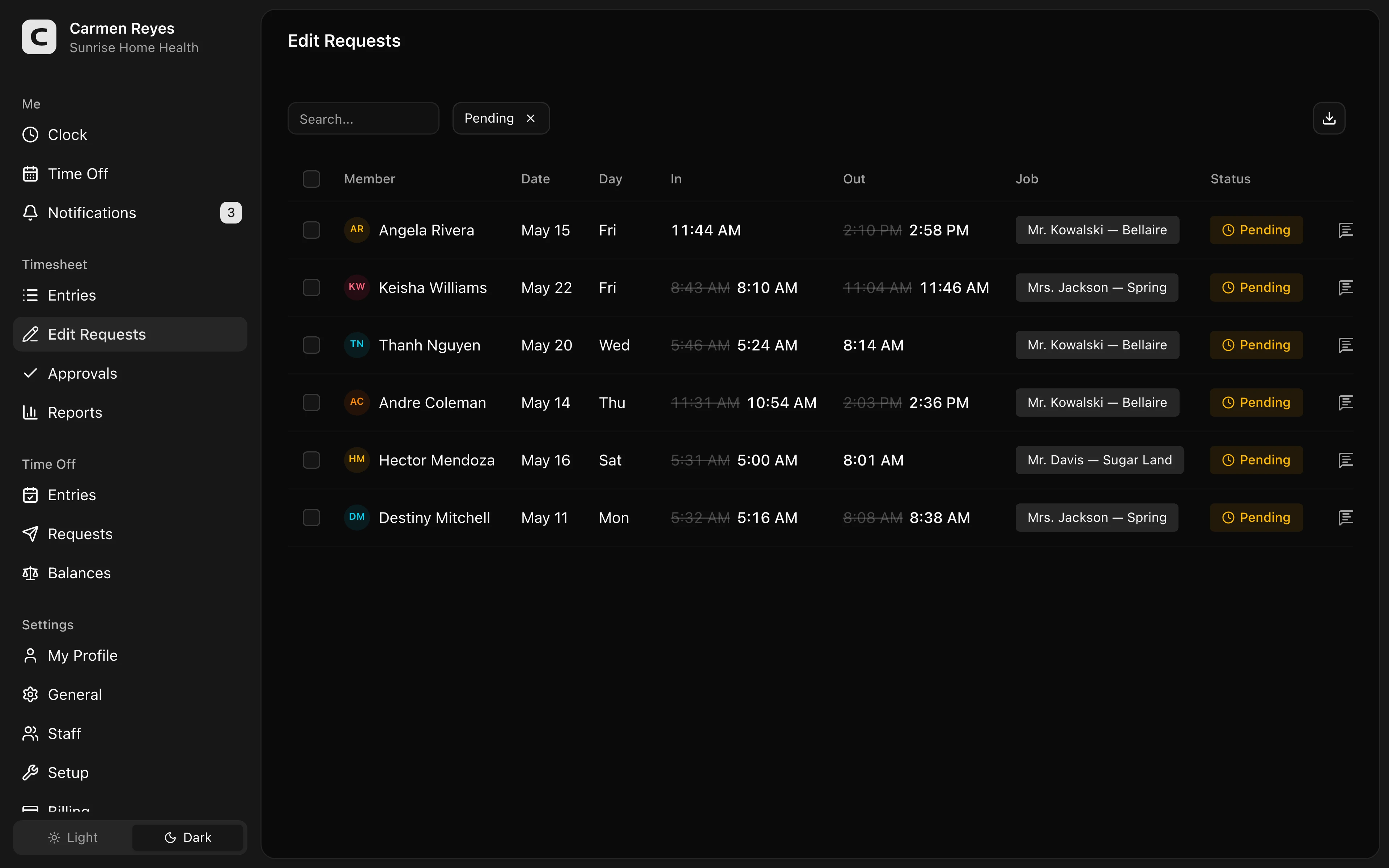 Open a no-login Clockspot demo with time entries, edits, approvals, and payroll-ready records.
Review travel and location context carefully
Caregiver missed punches often happen around transitions.
A caregiver may finish one client visit, drive to the next home, stop by the office for supplies, or pick up a same-day visit. If the missing punch sits near one of those transitions, the office should review the visit and travel context before approving the final time.
GPS or location context can help, but it should not be treated as the whole answer. A location point may reflect a driveway, apartment building, poor signal, schedule change, or office stop. The record still needs human review.
For the GPS side, read GPS time clock for home health care. For travel and mileage, read caregiver travel time and mileage.
Separate payroll readiness from discipline
Fixing the time record and deciding whether there is an attendance issue are different decisions.
Payroll needs an accurate record of time worked. If a caregiver forgot to clock out, the agency still needs to pay for hours actually worked. A repeated missed-punch pattern may need coaching or a policy conversation, but that should not erase the time record or hide the correction.
This distinction keeps the process fair:
- Pay the correct time.
- Keep the correction reason.
- Review repeated issues separately.
- Apply policy consistently.
For a policy starting point, use the missed punch correction policy template. If the missed punch also touches a visit, travel note, EVV record, or location question, use the caregiver visit review worksheet template. For a caregiver-specific time tracking policy, use the caregiver time tracking policy template.
Approve corrections before payroll export
The best time to fix missed punches is before payroll closes.
Before approving caregiver hours, the office should be able to answer:
- Are all visits tied to the right caregiver and client or location?
- Are missing clock-ins and clock-outs resolved?
- Do corrections include reasons?
- Did travel, mileage, or office stops need review?
- Did a supervisor approve the final time?
- Can the agency find the record later?
If the answer is no, payroll may still run on time, but the agency is paying from a record it cannot fully explain.
For the approval layer, read how to approve employee time cards.
When Clockspot is a good fit
Clockspot is a good fit when a home health or home care team needs a focused way to keep caregiver time records clear before payroll:
- Caregivers clock in and out from the field.
- Missed punches and edits keep a reason.
- Location context can support review.
- Supervisors approve final time before payroll.
- Old records stay searchable.
It may be a poor fit if the agency needs state-certified EVV, payer billing, care plans, clinical notes, or patient records in the same system.
If that matches your workflow, open the edit-request demo above, then check Clockspot pricing or start a free trial.
FAQ
What should a caregiver missed-punch correction include?
It should include the caregiver, affected visit or location, corrected time, reason for the change, reviewer, approval status, and the original record when available.
Can a home health agency change a caregiver time card?
An agency may need to correct a time record, but the correction should reflect time actually worked. Keep the original record, corrected time, reason, reviewer, and approval together.
Should GPS decide whether a missed punch is valid?
No. GPS can support review, but it should not be the final answer by itself. Review the visit, schedule, location context, correction reason, and supervisor approval.
The bottom line
A caregiver missed punch should be a review workflow, not a payroll scramble.
Keep the visit context, correction reason, approval, and final time record together so the agency can pay accurately and explain the record later.
Keep reading
How to Track Employee Hours for Payroll
Use this payroll-ready time tracking workflow to capture hours, review exceptions, approve edits, and keep records you can explain later.
GPS Time Clock for Home Health Care: What It Should and Should Not Do
A GPS time clock can help home health agencies review caregiver visits, travel, corrections, approvals, and payroll-ready records without replacing EVV.
Caregiver Visit Records: What to Keep Before Payroll
Keep caregiver visit time records, EVV context, travel notes, corrections, approvals, and payroll-ready records clear before payroll.
How to Handle Missed Punches Before Payroll
Use this missed-punch workflow to correct time cards before payroll, keep an audit trail, and avoid paying from hours nobody can explain.
About Clockspot
Clockspot helps small businesses track employee time and keep payroll-ready records. Used in all 50 states since 2007, we focus on getting time and pay right — including the wage-and-hour rules that shape both.
Clockspot helps field teams keep employee hours, location context, corrections, approvals, and payroll-ready records connected. See how Clockspot supports caregiver time tracking.