Caregiver Time Tracking Policy: What Home Health Agencies Should Include
Quick-read version · 1 minA caregiver time tracking policy should tell employees what to record before there is a payroll question.
Home health and home care work rarely looks like one shift in one building. A caregiver may visit multiple clients, drive between homes, return to the office, pick up a same-day visit, or need a missed punch corrected after the schedule changes.
Start with the caregiver's day
The policy should describe the day your agency actually needs to review:
- When the caregiver starts work.
- Which client, visit, job, or location the time belongs to.
- When the caregiver moves between visits.
- How mileage or travel notes should be submitted.
- How missed punches and corrections are reported.
- Who reviews and approves time before payroll.
- Where the final record can be found later.
If the policy only says "clock in and clock out," the office still has to guess when the day gets complicated.
If you are choosing the system behind the policy, read time clock app for home health care. If your agency also uses EVV, read EVV vs time tracking.
Separate EVV from the payroll time record
EVV can verify a covered visit. A caregiver time tracking policy still needs to explain how the agency handles the time record used for payroll review.
The policy should say:
- Whether caregivers clock in through a separate time clock.
- Whether visit start and end times are reviewed against the time record.
- How the office handles schedule changes.
- How corrections are submitted.
- Who approves the final hours.
- Where payroll-ready records live after the pay period closes.
Do not make caregivers guess whether EVV is the visit record, the payroll record, or both. Say what each record is used for.
Spell out travel and mileage separately
Travel time and mileage are related, but they are not the same thing.
The policy should tell caregivers what to do when they:
- Drive from one client to another during the workday.
- Stop at the office for supplies or paperwork.
- Pick up an added visit.
- Submit mileage under the agency's policy.
- Need to explain a route, delay, or missed punch.
Federal guidance treats ordinary home-to-work commuting differently from travel that happens as part of the workday. A policy should not try to turn every drive into a legal conclusion. It should make the facts clear enough for the agency to review before payroll.
For the pay rules behind travel and mileage, read travel time pay and mileage reimbursement requirements by state.
Require reasons for corrections
Missed punches happen. Late schedule changes happen. A good policy does not pretend otherwise.
It should require a short reason when someone changes the time record:
- Missed clock-in.
- Missed clock-out.
- Wrong client or location selected.
- Visit added after the schedule was posted.
- Travel or mileage note added late.
- Supervisor correction after review.
The point is not to punish honest mistakes. The point is to keep the record understandable when payroll, a manager, or the owner looks at it later.
For a deeper correction workflow, read how to handle missed punches before payroll.
Make approval part of the policy
Caregiver time should not go straight from raw entries to payroll.
The policy should say who approves time and when:
- Caregivers review obvious mistakes before approval.
- Supervisors review exceptions.
- Corrections include reasons.
- Final time cards are approved before payroll export.
- Late corrections stay visible after the pay period closes.
Approval gives payroll a reviewed record instead of a list of open questions.
If approvals are a weak spot, read how to approve employee time cards.
This is the part of the policy that needs to become visible before payroll. In Clockspot, the approvals screen shows which time cards are ready, which ones still need attention, and where a supervisor can review final hours before payroll moves forward.
No login required. Opens in one click.
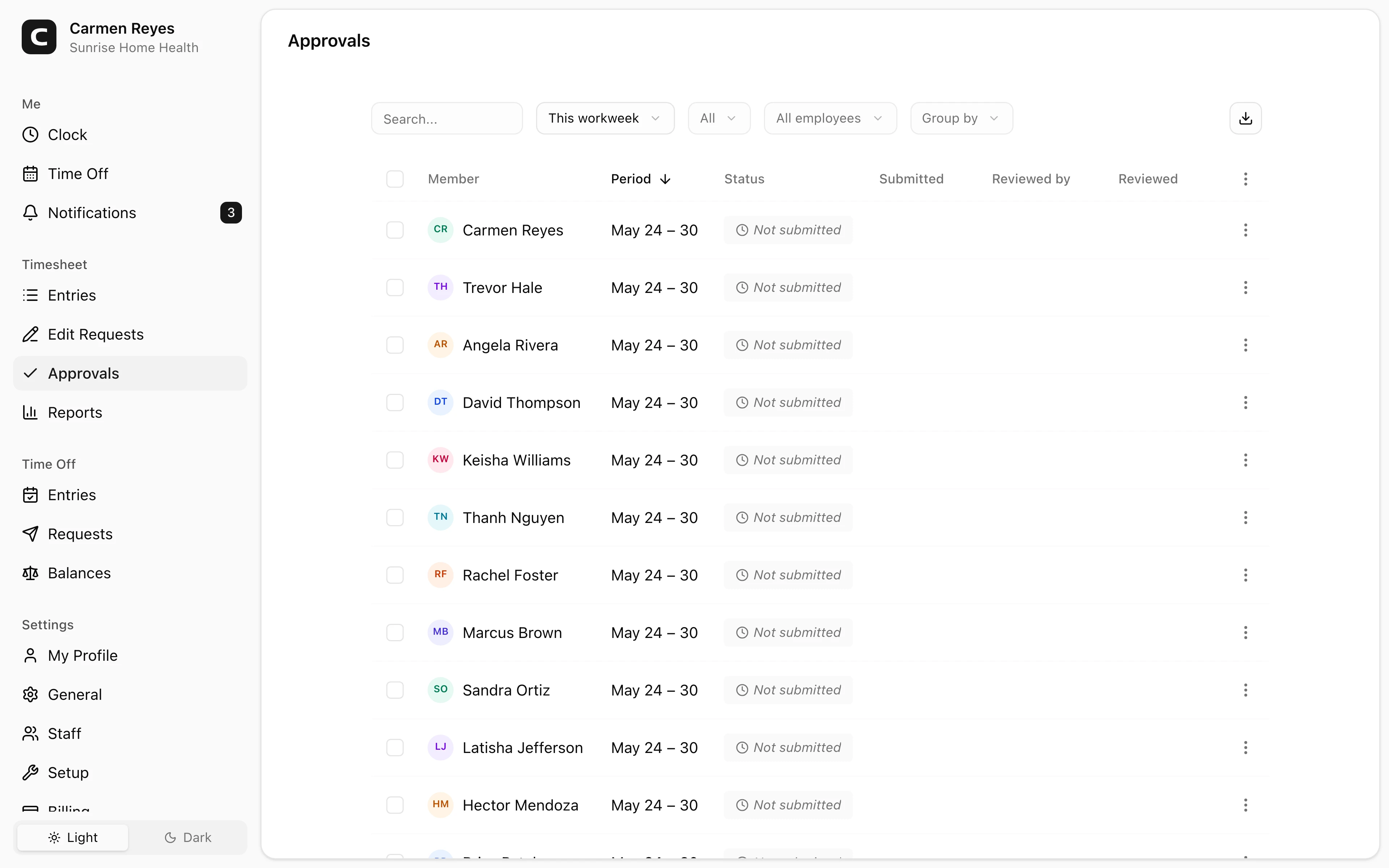
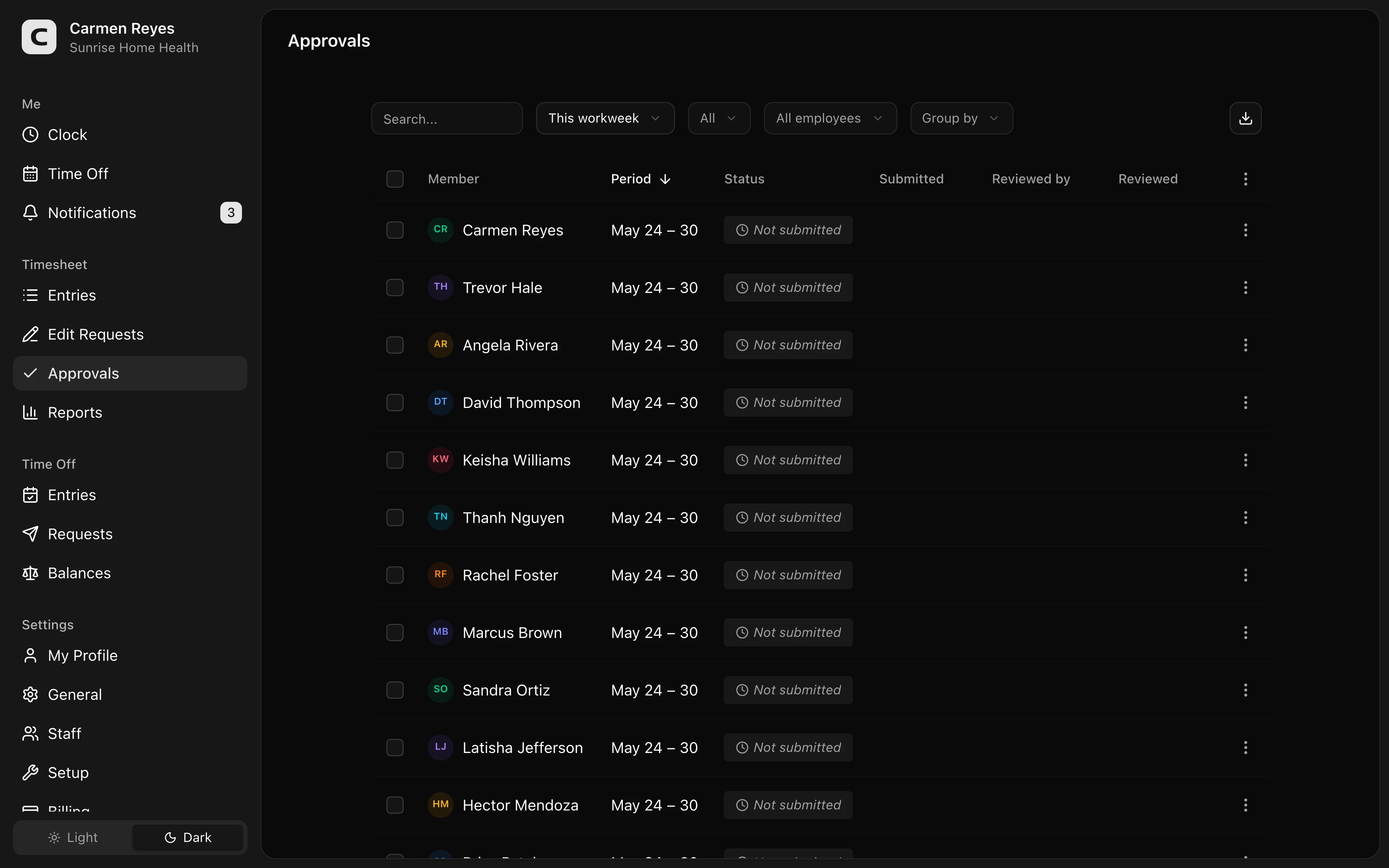 Open a no-login Clockspot demo with time entries, edits, approvals, and payroll-ready records.
Keep the policy short enough to follow
The best policy is not the longest policy. It is the one caregivers and supervisors can remember during a busy week.
A practical version can fit on one page:
- Clock in and out when work starts and ends.
- Select the right client, visit, job, or location when required.
- Report missed punches as soon as you notice them.
- Include a reason for corrections.
- Submit mileage or travel notes under the agency's policy.
- Review your time before approval.
- Supervisors approve final time before payroll.
If the policy needs a separate legal addendum for state-specific rules, keep that separate from the day-to-day instructions.
For copyable policy language, start with this template and adapt the client, visit, travel, and approval terms to your agency.
When Clockspot is a good fit
Clockspot is a good fit when a home health, home care, or field-service team needs focused employee time tracking before payroll:
- Caregivers clock in and out from the field.
- Hours can be reviewed with location context.
- Missed punches and edits include reasons.
- Supervisors approve final time before payroll.
- Payroll-ready records stay searchable after the pay period closes.
Clockspot may be a poor fit if the agency needs state-certified EVV, clinical documentation, payer billing, care plans, mileage reimbursement processing, or patient records in the same product.
If that matches your agency's time-tracking problem, check Clockspot pricing or start a free trial.
FAQ
Does a caregiver time tracking policy replace EVV?
No. EVV and time tracking can overlap, but they answer different questions. EVV verifies covered visits. A time tracking policy explains how employee hours, corrections, approvals, and payroll-ready records are handled.
Should caregivers record travel time?
They should follow the agency's policy. Ordinary commuting is different from travel that happens during the workday, and state rules can add detail. The policy should make travel facts clear enough for review before payroll.
Should missed punches require a reason?
Yes. A short reason helps the agency understand what changed and why. The goal is a clear record, not extra paperwork for its own sake.
The bottom line
A caregiver time tracking policy should make the workday easier to explain.
Tell caregivers what to record, how to report corrections, when travel or mileage notes matter, and who approves final time before payroll.
Keep reading
How to Track Employee Hours for Payroll
Use this payroll-ready time tracking workflow to capture hours, review exceptions, approve edits, and keep records you can explain later.
How to Handle Missed Punches Before Payroll
Use this missed-punch workflow to correct time cards before payroll, keep an audit trail, and avoid paying from hours nobody can explain.
How to Approve Employee Time Cards Before Payroll
Use this time card approval workflow to review exceptions, confirm corrections, and send payroll hours you can explain later.
Time Clock App for Home Health Care: What Agencies Should Look For
Choose a home health care time clock app by checking caregiver visits, EVV fit, GPS, mileage, travel time, approvals, payroll export, and records.
About Clockspot
Clockspot helps small businesses track employee time and keep payroll-ready records. Used in all 50 states since 2007, we focus on getting time and pay right — including the wage-and-hour rules that shape both.
Clockspot helps small businesses keep employee hours, location context, corrections, approvals, and payroll-ready records connected. See how Clockspot supports caregiver time tracking.