Time Clock App for Dental Offices: What to Look For
Quick-read version · 1 minDental offices need employee time records that keep up with the schedule.
Hygienists, dental assistants, front desk staff, sterilization support, billing staff, and office managers may work around late patients, lunch blocks, room turnover, and multi-location coverage. Before payroll, the office needs accurate staff hours and a clear approval record.
Start with the office schedule
Before choosing a time clock, decide what the office needs to review:
- When each employee started and stopped paid work.
- Whether the employee worked front desk, chairside, sterilization, billing, or another role.
- Which office or location the time belongs to when the practice has more than one location.
- Whether breaks were recorded under your process.
- Which missed punches or edits were corrected.
- Why each correction was made.
- Who approved the final time.
For a broader clinic comparison, read time clock app for medical and dental clinics.
Late appointments should not create payroll guesswork
A dental day can change quickly. A last patient may run late. A hygienist may stay to finish notes or reset a room. An assistant may cover sterilization after the schedule shifts.
Those are normal office situations. The time clock should make the final hours easy to review, with correction notes and approval when something changed.
For missed-punch workflow, read how to handle missed punches before payroll.
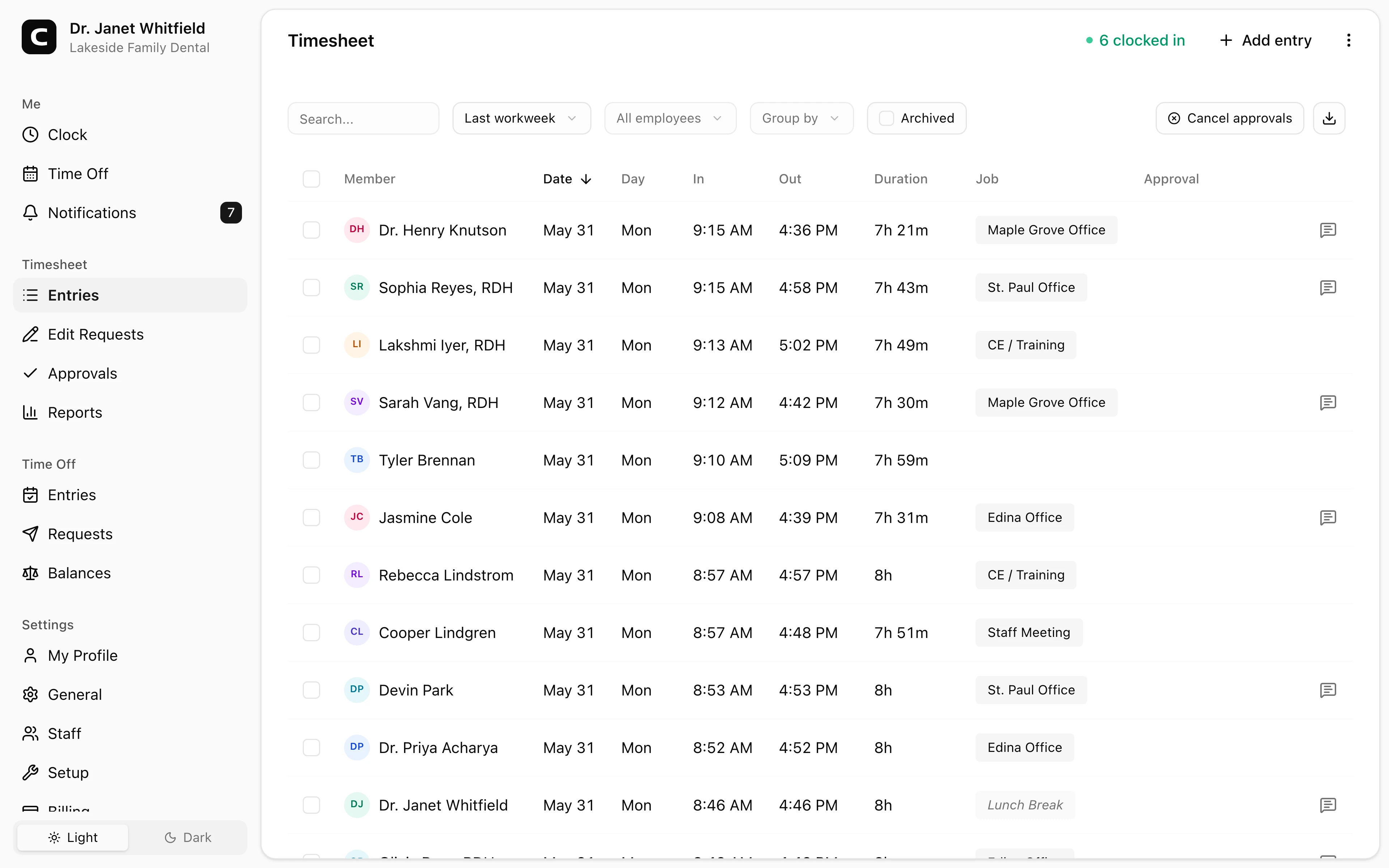
Explore the sample account
Lakeside Family Dental is an example dental practice in the Twin Cities, Minnesota, with staff hours, multiple office locations, corrections, approvals, and reports already filled in with sample data.
No login required. Opens in one click.
Keep practice systems separate
A dental office time clock should not replace patient scheduling, treatment notes, dental billing, insurance claims, credentialing, payroll processing, HR, or accounting.
It should do the narrower job well: help staff record time, help the office review changes, and keep approved records ready before payroll.
When Clockspot is a good fit
Clockspot is a good fit when a dental office needs focused employee time tracking:
- Staff clock in and out from a phone, computer, or shared device.
- Managers review missed punches, breaks, edits, overtime questions, and approvals.
- Multi-location or role detail can be captured when the office needs it.
- Approved hours are ready before payroll.
Clockspot may be a poor fit if you need one system for patient scheduling, clinical notes, claims, practice management, payroll processing, HR, or accounting.
If this is the workflow you need, open the demo above, then check Clockspot pricing or start a free trial.
FAQ
What should a dental office time clock track?
A dental office time clock should track clock-ins, clock-outs, missed punches, break records when used, correction reasons, approvals, and office or role detail when that helps review.
Should dental offices track time by role?
Track role detail only if the office uses it. It can help when employees move between front desk, chairside, sterilization, billing, or multiple locations.
Does Clockspot replace dental practice management software?
No. Clockspot tracks employee time and payroll-ready records. Scheduling, treatment notes, billing, claims, HR, payroll processing, and accounting are separate systems.
The bottom line
A dental office time clock should make staff hours easier to review before payroll.
Choose the app that keeps hours, corrections, roles or locations, and approvals clear without adding another complicated practice system.
Keep reading
How to Track Employee Hours for Payroll
Use this payroll-ready time tracking workflow to capture hours, review exceptions, approve edits, and keep records you can explain later.
Time Clock App for Medical and Dental Clinics: What to Look For
Choose a medical or dental clinic time clock by checking staff clock-ins, breaks, missed punches, approvals, payroll export, and records.
How to Handle Missed Punches Before Payroll
Use this missed-punch workflow to correct time cards before payroll, keep an audit trail, and avoid paying from hours nobody can explain.
Time Clock App for Medical Clinics: What to Look For
Choose a medical clinic time clock by checking staff hours, breaks, missed punches, approvals, location detail, and payroll-ready records.
About Clockspot
Clockspot helps small businesses track employee time and keep payroll-ready records. Used in all 50 states since 2007, we focus on getting time and pay right — including the wage-and-hour rules that shape both.
Clockspot helps dental offices keep staff hours, corrections, approvals, and payroll-ready records together. See how Clockspot supports dental office time tracking.