Cleaning Company Proof of Work: Time Records for Client Questions
Quick-read version · 1 minWhen a cleaning client questions a job, a clear time record is better than a memory contest.
The question may be simple: Did the crew arrive? How long were they there? Why did this job take longer than usual? If the answer lives in texts, paper notes, and a payroll spreadsheet, the owner has to reconstruct the job after the client is already frustrated.
Start with what the client is asking
Most client questions are not really about software. They are about the job record.
The owner or manager may need to answer:
- Which cleaner or crew worked the job?
- Which client, building, unit, route, or location was selected?
- When did the crew clock in and out?
- Was there a missed punch, correction, supply stop, or job change?
- Did a manager approve the final time?
- Can the business find the record later?
That record helps the cleaning company respond calmly. It does not have to accuse the employee or argue with the client. It gives the office a shared set of facts to review.
For the full payroll-ready workflow, read how to track employee hours for payroll. For the cleaning-specific setup, read how to track cleaning crew hours by client or job.
Client and job labels do the heavy lifting
GPS can be useful, but the client or job label is what usually makes the record understandable.
If an employee clocks in near a strip mall, GPS may show the area. It may not tell the office whether the time belongs to the dental office, the retail store, the property manager's common area, or a one-time floor job in the same building.
The time record should make the basic assignment clear:
- Client or account.
- Job, building, unit, or location.
- Crew or employee.
- Start and end time.
- Correction reason when the record changed.
- Approval before payroll.
The job-costing demo below shows how job and location choices give the office something concrete to review after the work is done.
No login required. Opens in one click.
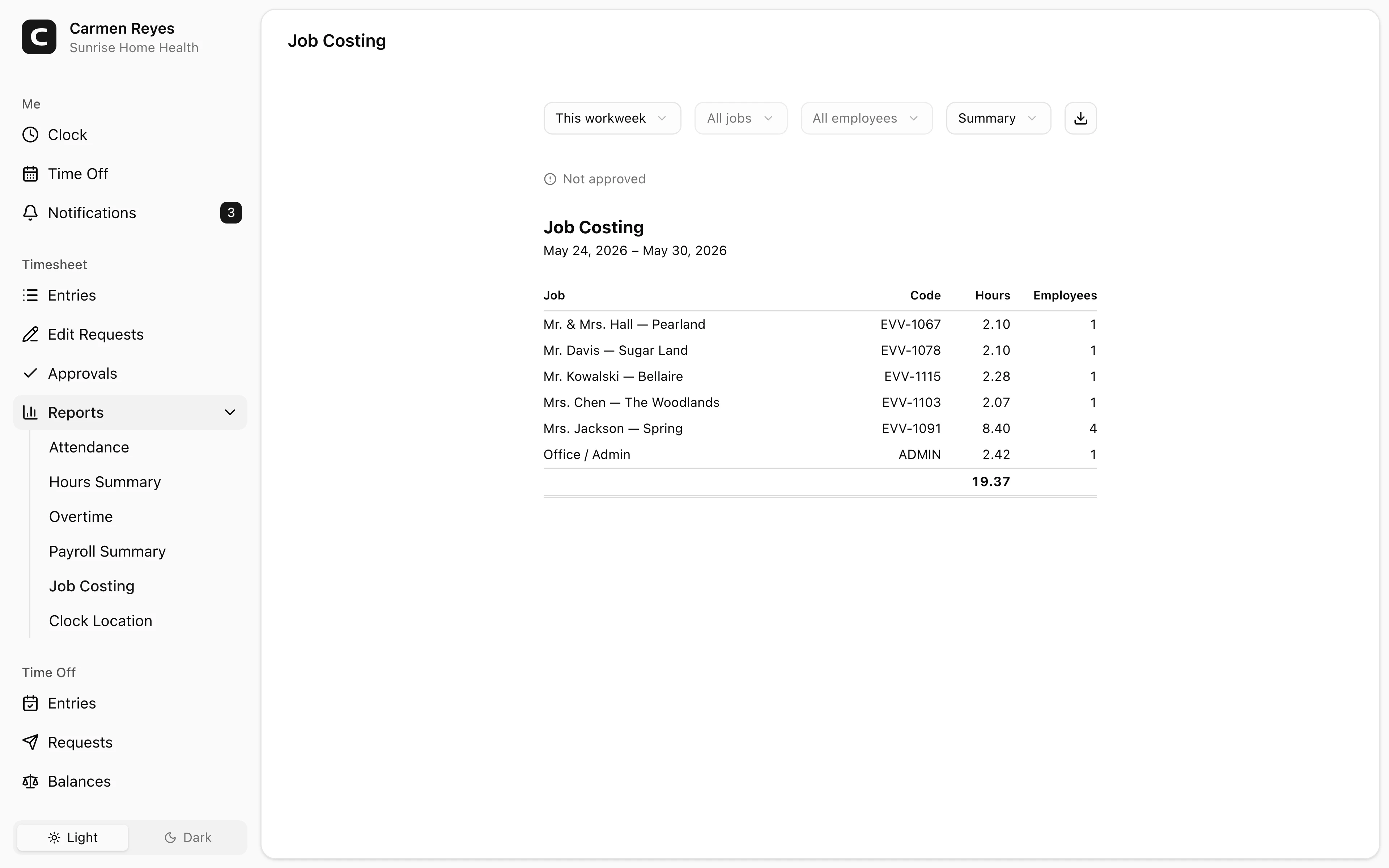
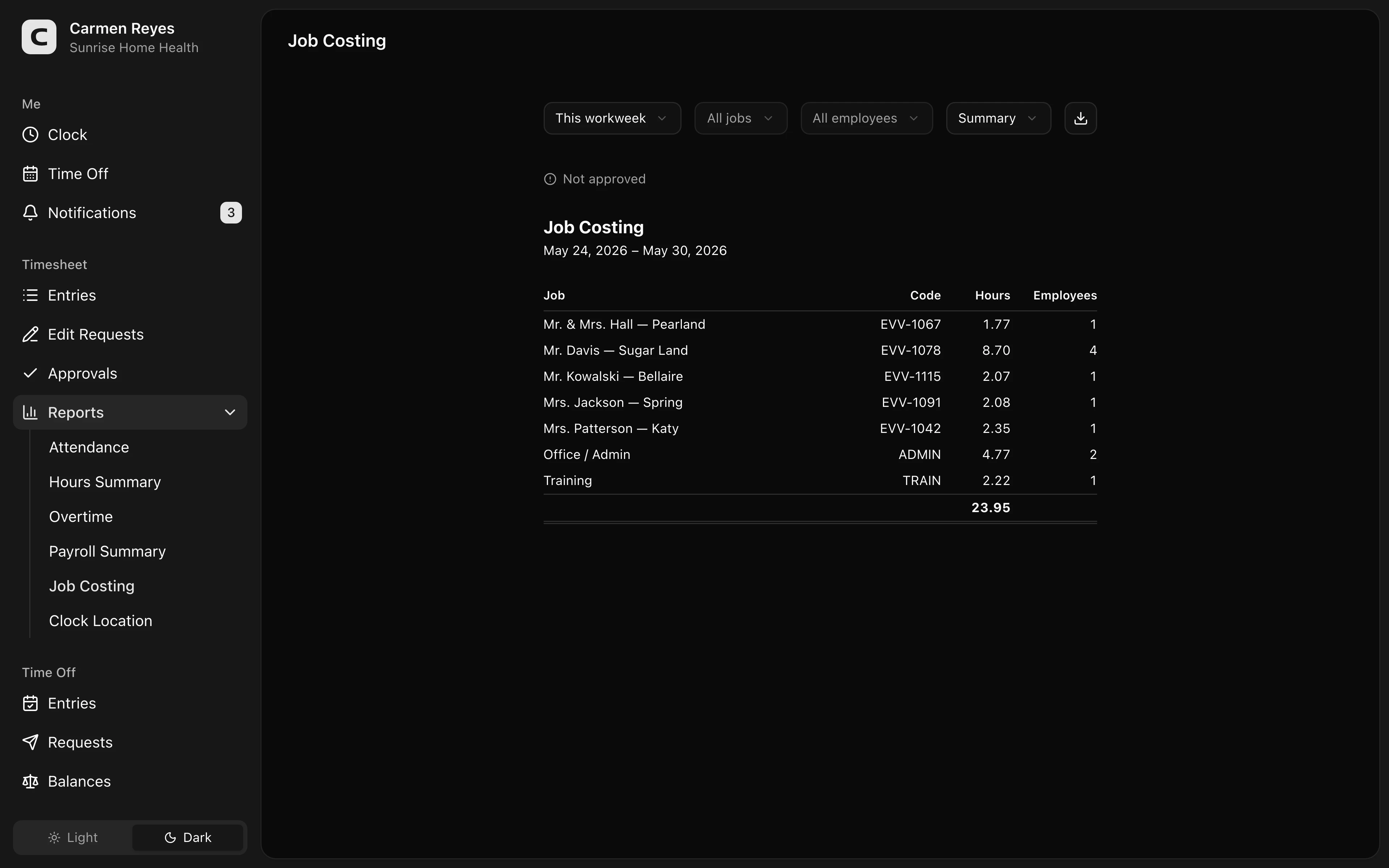 Open a no-login Clockspot demo with time entries, edits, approvals, and payroll-ready records.
Keep corrections visible
Client questions often surface after a correction has already happened.
Maybe a cleaner selected the wrong job, forgot to clock out, changed locations mid-shift, or added time for a supply stop. If the correction overwrites the original record without a reason, the office loses the explanation right when it needs it.
A useful correction record keeps:
- The original entry.
- The corrected entry.
- The reason for the change.
- The person who made or approved the change.
- The final approved time.
For the broader correction process, read how to handle missed punches before payroll.
Use GPS as context, not the whole answer
Location context can help when employees work away from the office.
It can show that a clock-in happened near the expected client site, or that a crew moved between jobs during the day. But it should not replace the client or job label, the correction reason, or manager approval.
A fair review treats GPS as one part of the record. Poor signal, parking lots, shared buildings, supply stops, and schedule changes can all require explanation.
For the cleaning-specific GPS page, read GPS time clock for cleaning companies. For a policy starting point, use the GPS time tracking policy template.
If you want a fillable worksheet for reviewing a client question, use the cleaning client job review worksheet template.
If you need a simple paper or PDF backup for crew hours before payroll, use the cleaning crew timesheet template.
Decide what belongs in the time record
The time clock should not become a full cleaning-business management system.
It does not need to hold inspection photos, client messages, dispatch notes, route optimization, supply inventory, or invoice approval unless that is the system's job.
For time tracking, the essential record is narrower:
- Who worked.
- When they worked.
- Which client or job the time belongs to.
- Whether a correction changed the record.
- Whether the time was approved before payroll.
That is enough to support payroll-ready review and many client questions without turning the time clock into a cluttered operations notebook.
When Clockspot is a good fit
Clockspot is a good fit when a cleaning company needs focused time tracking for field crews:
- Cleaners clock in and out from client sites.
- Time can be assigned to clients, jobs, locations, or cost codes.
- Corrections keep the reason for the change attached to the time record.
- Managers approve final time before payroll.
- Job-time records stay searchable.
It may be a poor fit if the company mainly needs booking, dispatch, inspections, invoicing, route optimization, or a full cleaning-business management platform.
If that matches your workflow, open the job-costing demo above, then check Clockspot pricing or start a free trial.
FAQ
What time records help with cleaning client questions?
The most useful records show the cleaner or crew, client or job, clock-in and clock-out times, correction reasons, approval status, and any job note needed to explain the time.
Is GPS enough to prove a cleaning job was done?
No. GPS can support review, but it should not be the whole record. Client/job labels, time entries, correction reasons, manager approval, and the actual work record still matter.
Should cleaning companies track every detail in the time clock?
No. Track the details needed for payroll-ready time, job review, and manager approval. Keep dispatch, inspections, invoicing, and client-management details in the systems that own those jobs.
The bottom line
Cleaning companies handle client questions better when job time is easy to explain.
Keep the crew, client, location, correction reason, and approval record together so the business can respond from a clear record instead of rebuilding the job from memory.
Keep reading
How to Track Employee Hours for Payroll
Use this payroll-ready time tracking workflow to capture hours, review exceptions, approve edits, and keep records you can explain later.
GPS Time Clock for Cleaning Companies: What to Look For
A GPS time clock can help cleaning companies review client jobs, crew travel, wrong-job punches, corrections, approvals, and payroll-ready records.
How to Handle Missed Punches Before Payroll
Use this missed-punch workflow to correct time cards before payroll, keep an audit trail, and avoid paying from hours nobody can explain.
How to Track Cleaning Crew Hours by Client or Job
Set up cleaning crew time tracking so hours stay tied to the right client, job, location, approval, and payroll record.
About Clockspot
Clockspot helps small businesses track employee time and keep payroll-ready records. Used in all 50 states since 2007, we focus on getting time and pay right — including the wage-and-hour rules that shape both.
Clockspot helps field teams keep employee hours, job/location context, corrections, approvals, and payroll-ready records connected. See how Clockspot supports cleaning company time tracking.