How to Close a Pay Period for Hourly Employees
Closing a pay period should not feel like racing the clock.
For hourly employees, pay-period close is the point where draft time records become payroll records. If missing punches, edits, overtime, breaks, and approvals are still unresolved, payroll may run on numbers the business cannot fully explain.
The pay-period close workflow
Each pay period should close the same way, so payroll does not depend on memory or a last-minute scramble:
- Confirm every hourly employee has a complete time card.
- Resolve missing punches.
- Review overtime, breaks, job changes, and location exceptions.
- Confirm manual edits have reasons.
- Get manager approval before export.
- Export or summarize approved hours for payroll.
- Mark the period as closed.
- Document late corrections separately.
The goal is not to make payroll slower. It is to make payroll less fragile.
Start with completeness
Before you review payroll totals, make sure every shift has the records needed to explain it.
Look for:
- Employees with no time card.
- Shifts missing a clock-in or clock-out.
- Breaks with only one side recorded.
- Time entered after the shift.
- Employees assigned to the wrong job, department, or location.
- Manual edits with no reason.
If the time card is incomplete, the total may be wrong even if the payroll report looks clean.
The demo below shows the payroll-summary view after time cards have been reviewed. It is useful here because closing the pay period is not just adding hours; it is checking whether the records behind the total are complete enough to export.
No login required. Opens in one click.
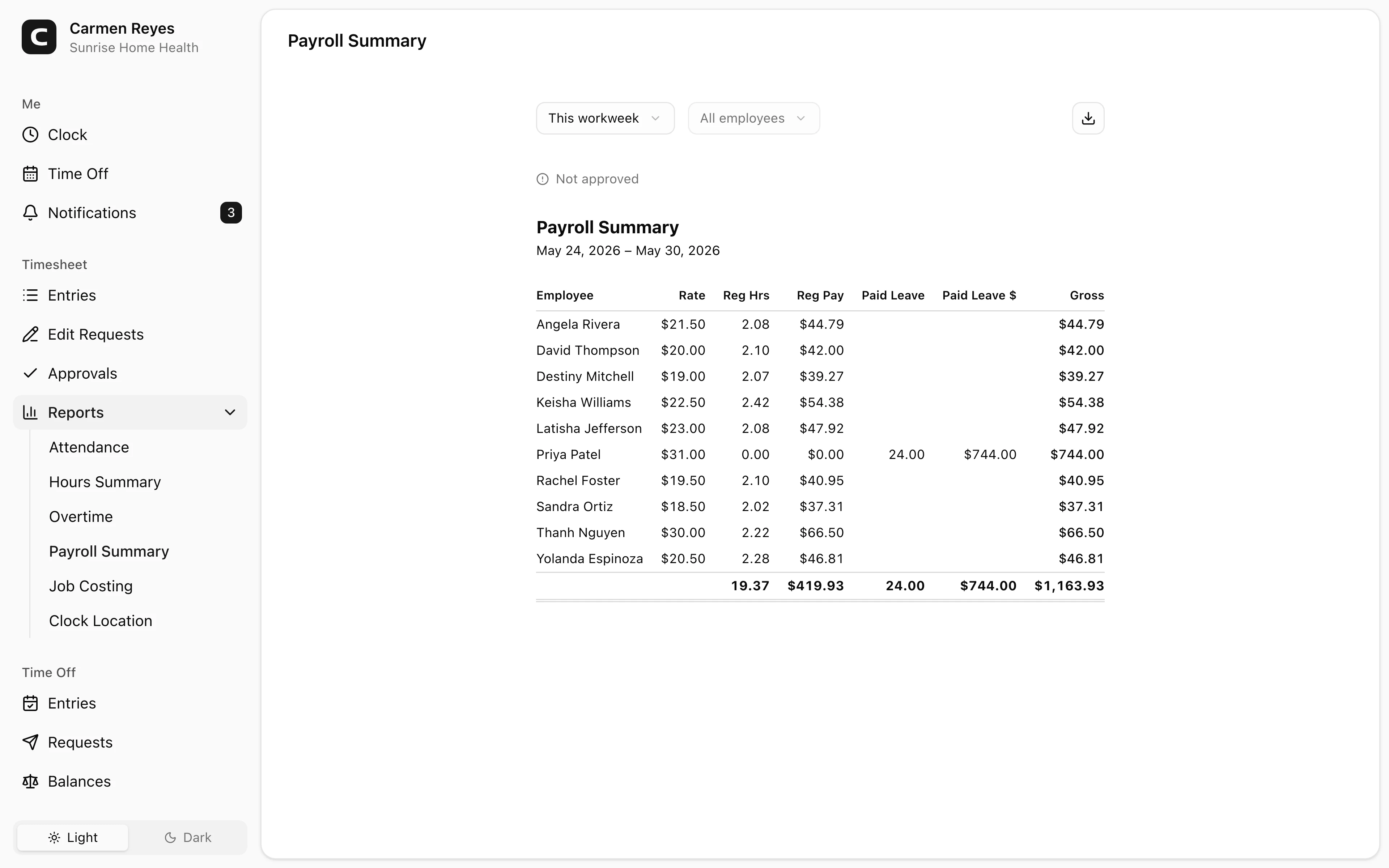
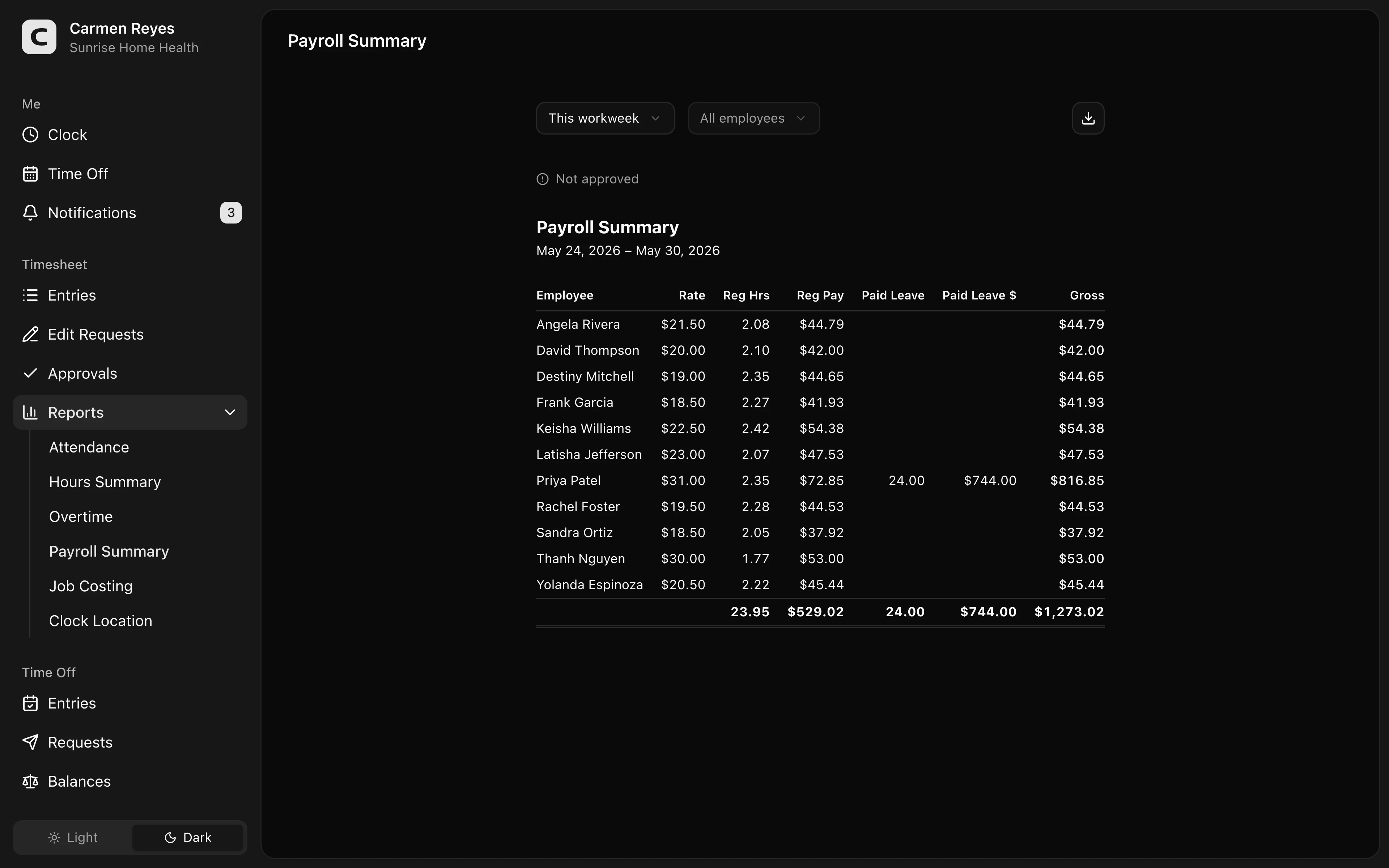 Open a no-login Clockspot demo with time entries, edits, approvals, and payroll-ready records.
Resolve exceptions before export
Payroll should receive approved hours, not open questions.
A practical close process reviews the records most likely to change pay:
- Overtime or near-overtime weeks.
- Long shifts.
- Missed or short breaks.
- Missed punches.
- Manual edits.
- Location or job mismatches.
- Late time entries.
You do not need to manually audit every normal shift. You need to stop unresolved exceptions from becoming payroll outputs.
For missed punches, read how to handle missed punches before payroll. For approval workflow, read how to approve employee time cards.
Approve before payroll runs
Approval should happen before hours move into payroll.
The manager closest to the work should approve the final time card. Payroll should verify that approvals are complete and that no unresolved exceptions remain. The business owner should define the policy: who can approve, who can edit, and what happens after a period closes.
That separation matters. Payroll may know how to process the pay run, but the manager usually knows what happened during the shift.
Export only approved hours
Once hours are approved, export or summarize them for payroll.
Keep the connection between the payroll total and the underlying time record. If payroll shows 78.25 hours, the business should still be able to see the days, shifts, edits, approvals, and notes that produced that number.
For the larger recordkeeping layer, read recordkeeping requirements by state.
Lock the period, but do not hide late corrections
After payroll runs, mark the pay period as closed or locked.
That does not mean mistakes can never be corrected. It means a later correction should be visible as a later correction. Do not quietly reopen the old period, change the record, and leave no trail.
If the correction affects pay, handle it as a payroll adjustment, retro pay, or the process your payroll provider uses for corrections. For deeper context, read how to calculate retro pay.
A simple close checklist
Before payroll runs, ask:
- Are all time cards complete?
- Are missed punches fixed with reasons?
- Are overtime and break exceptions reviewed?
- Are manual edits approved?
- Are all required managers done approving?
- Can payroll trace each total back to the time records?
- Is there a plan for late corrections after close?
If the answer is no, the pay period is not ready yet.
Common mistakes
Exporting before approval
Exporting unapproved hours makes payroll the first real reviewer. That is backwards.
Treating payroll export as the record
Payroll export is an output. The time record behind the export still matters.
Closing with missing punches
A missing punch can change overtime, break records, and the total paid. Fix it before close.
Reopening closed periods quietly
Late corrections should be visible. Keep the old record, the correction, the reason, and the payroll adjustment.
Waiting until payroll day
Pay-period close works best when exceptions are reviewed throughout the period, not all at once on payroll morning.
FAQ
What does it mean to close a pay period?
It means the business has reviewed, corrected, approved, and exported the final hours for that pay period. After close, changes should be handled as corrections, not hidden edits.
Should payroll close time cards or managers?
Managers should approve the time cards because they are closest to the work. Payroll should verify that approvals are complete and export the approved hours.
Can you change a time card after payroll closes?
Yes, if the record is wrong. But the later change should be documented and handled through the proper payroll correction process.
What should be checked before payroll export?
Check missing punches, overtime, breaks, manual edits, job or location errors, manager approvals, and whether the payroll total can be traced back to the underlying time records.
The bottom line
A good pay-period close gives payroll approved hours and a record the business can still explain later.
Complete the time cards, resolve exceptions, approve the hours, export the record, and keep the trail behind the paycheck.
Keep reading
How to Track Employee Hours for Payroll
Use this payroll-ready time tracking workflow to capture hours, review exceptions, approve edits, and keep records you can explain later.
How to Handle Missed Punches Before Payroll
Use this missed-punch workflow to correct time cards before payroll, keep an audit trail, and avoid paying from hours nobody can explain.
How to Approve Employee Time Cards Before Payroll
Use this time card approval workflow to review exceptions, confirm corrections, and send payroll hours you can explain later.
Payroll Approval Workflow for Small Business
Build a payroll approval workflow that reviews employee time cards, fixes exceptions, gets manager approval, exports payroll, and keeps records.
About Clockspot
Clockspot helps small businesses track employee time and keep payroll-ready records. Used in all 50 states since 2007, we focus on getting time and pay right — including the wage-and-hour rules that shape both.
Clockspot helps small businesses review time cards, approve hours, and keep payroll-ready records together before each pay run. See how Clockspot keeps hours payroll-ready.