Mobile Time Clock: How Employees Clock In From Their Phone
When employees work away from a front desk, the phone in their pocket is usually the most reliable time clock you have. A mobile time clock lets them clock in and out from their phone, so the hours are captured where the work happens instead of reconstructed later.
The part that trips up small businesses is assuming "mobile" means "download our app." It does not have to.
Mobile does not have to mean an app
An employee can clock in from a phone's web browser without installing anything. They open a link and clock in, and a new hire can start from an emailed invite instead of going to an app store first.
That matters because app installs are where mobile time tracking stalls: employees do not want a work app on a personal phone, phone storage is full, or the install never happens and the employee falls back to texting the manager. A browser clock-in skips all of that and still produces the same record.
If some of your employees do not carry a smartphone at all, mobile is only part of the answer. Pair it with a phone call-in path, covered in employee time clock without a smartphone or app.
What a mobile clock-in captures
A clock-in from an employee's own account can carry context the office can review, not just a timestamp:
- Location. When the phone shares its location, the clock-in records GPS coordinates, so you can review whether the entry matches where the work was. See employee time clock with GPS for when location is worth turning on.
- IP and device. Useful context even when GPS is off.
- Job, client, or project. Employees can pick what they are working on at clock-in, so mobile hours land on the right record.
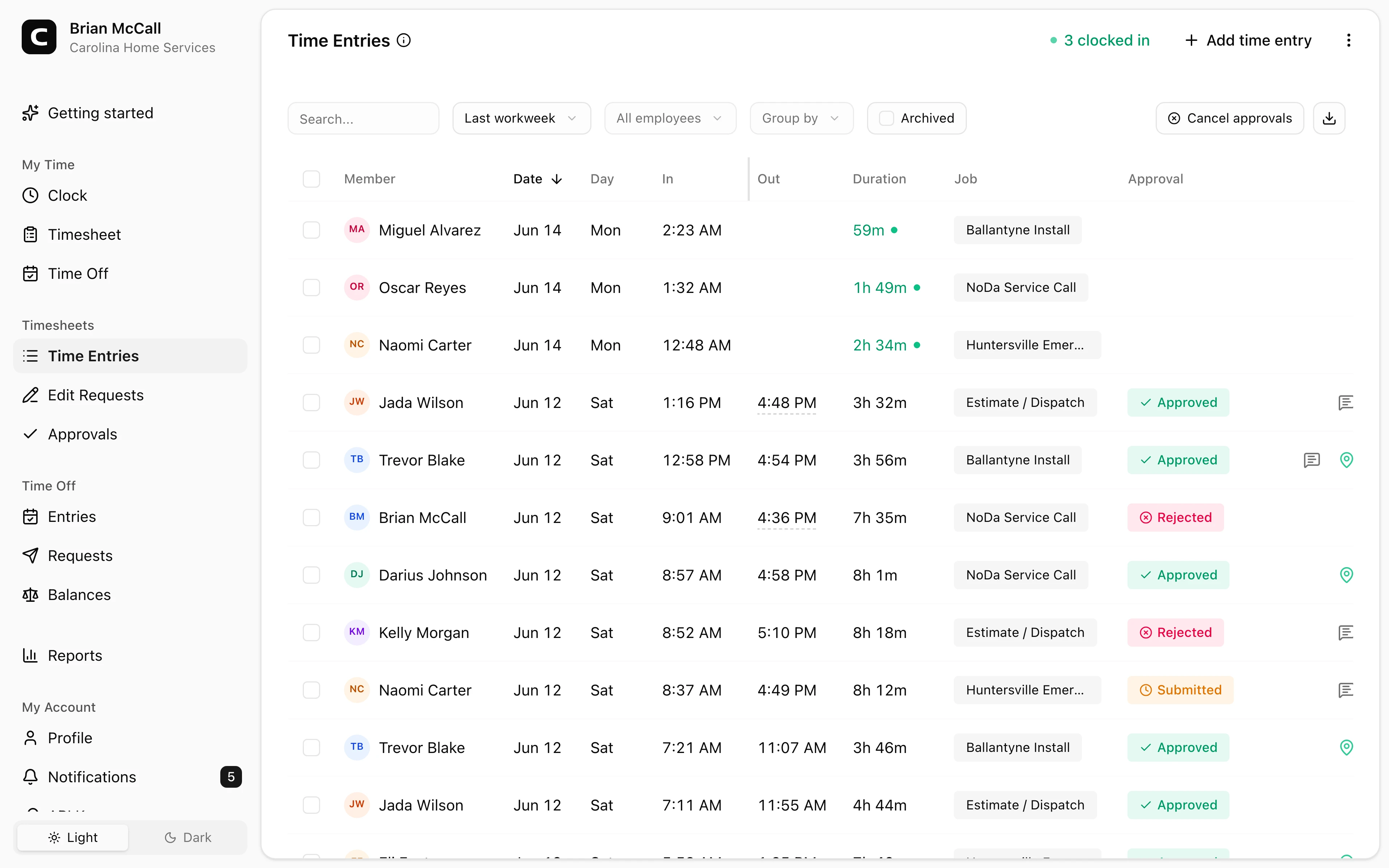
We can show what those mobile clock-ins look like once they reach the office: hours, jobs, and locations on one reviewable timesheet.
Explore the sample account
Carolina Home Services is an example contractor in Charlotte, North Carolina, with employee time cards, edits, approvals, jobs, and reports already filled in with sample data.
No login required. Opens in one click.
Review mobile hours before payroll
Mobile clock-ins are only useful if the office can stand behind them. Before payroll, a manager should be able to catch a missed punch, approve a correction with a reason, and approve the timesheet, so the final hours are reviewed rather than taken on faith. Approved hours then export cleanly instead of being retyped.
Best fit and poor fit
A mobile time clock fits field employees, multi-site crews, and anyone who clocks in away from a manager. It replaces end-of-week guessing with a reviewable record of when work started and, when location is shared, where.
It is overkill if every employee clocks in from the same shop computer and never leaves. In that case a shared computer or kiosk is simpler. And it is the wrong tool by itself if your employees do not have smartphones, where a phone call-in serves them better.
What it does not replace
A mobile time clock records hours and makes them reviewable. It does not run payroll, file taxes, or replace scheduling, dispatch, or field-service software. It is the time record that has to be right before payroll, not the whole operation.
The rule to carry forward
Let employees clock in from the phone they already carry, capture the location and job when it helps, and review the hours before payroll. Do not gate mobile time tracking behind an app install.
To set this up, see the Clockspot mobile time clock, then check Clockspot pricing or start a free trial.
Keep reading
How to Track Employee Hours for Payroll
Use this payroll-ready time tracking workflow to capture hours, review exceptions, approve edits, and keep records you can explain later.
Employee Time Clock Without a Smartphone or App: Your Options
How employees clock in without a smartphone or an app: phone call-in with a PIN, a shared computer or kiosk, and a browser link. What to look for before you choose.
Employee Time Clock With GPS: When Small Businesses Need It
Use GPS time tracking when location affects payroll, job costing, field work, approvals, or trust. Here is what to look for before choosing a GPS time clock.
Photo Time Clock: When to Use Verification Photos
A photo time clock adds verification photos to kiosk clock-ins. Learn what Clockspot captures, what it does not do, and when photo capture helps.
About Clockspot
Clockspot helps small businesses track employee time and keep payroll-ready records. Used in all 50 states since 2007, we focus on getting time and pay right — including the wage-and-hour rules that shape both.
Clockspot lets employees clock in from any phone or computer with no app to install, and keeps mobile hours payroll-ready for the office to review. See how Clockspot supports mobile time tracking.