Employee Time Clock Without a Smartphone or App: Your Options
Quick-read version · 1 minPlenty of employees do not have a smartphone, are not allowed to install a work app, or work where the internet is unreliable. They still need a way to clock in that the office can trust.
The good news: a smartphone app is only one way to track time. A clock-in by phone call, a shared computer, or a plain browser link can all produce the same payroll-ready record, as long as the office can tell who clocked in and review the entry before payroll.
Why "no smartphone" is a real constraint
It is easy to assume every worker carries a smartphone. In practice, a small business often runs into one of these:
- Some employees do not own a smartphone, or do not want to use a personal phone for work.
- Company policy does not allow installing apps on personal devices.
- The job site has weak or no internet, so an app cannot connect.
- Seasonal hires or employees who prefer a simpler path would rather not learn a new app.
When clocking in depends on an app, those employees end up on paper, on a text message, or calling the manager, and the office rebuilds the week by hand. The fix is not forcing everyone onto an app. It is offering a clock-in path that does not need one.
Three ways to clock in without an app
Clock in by phone call
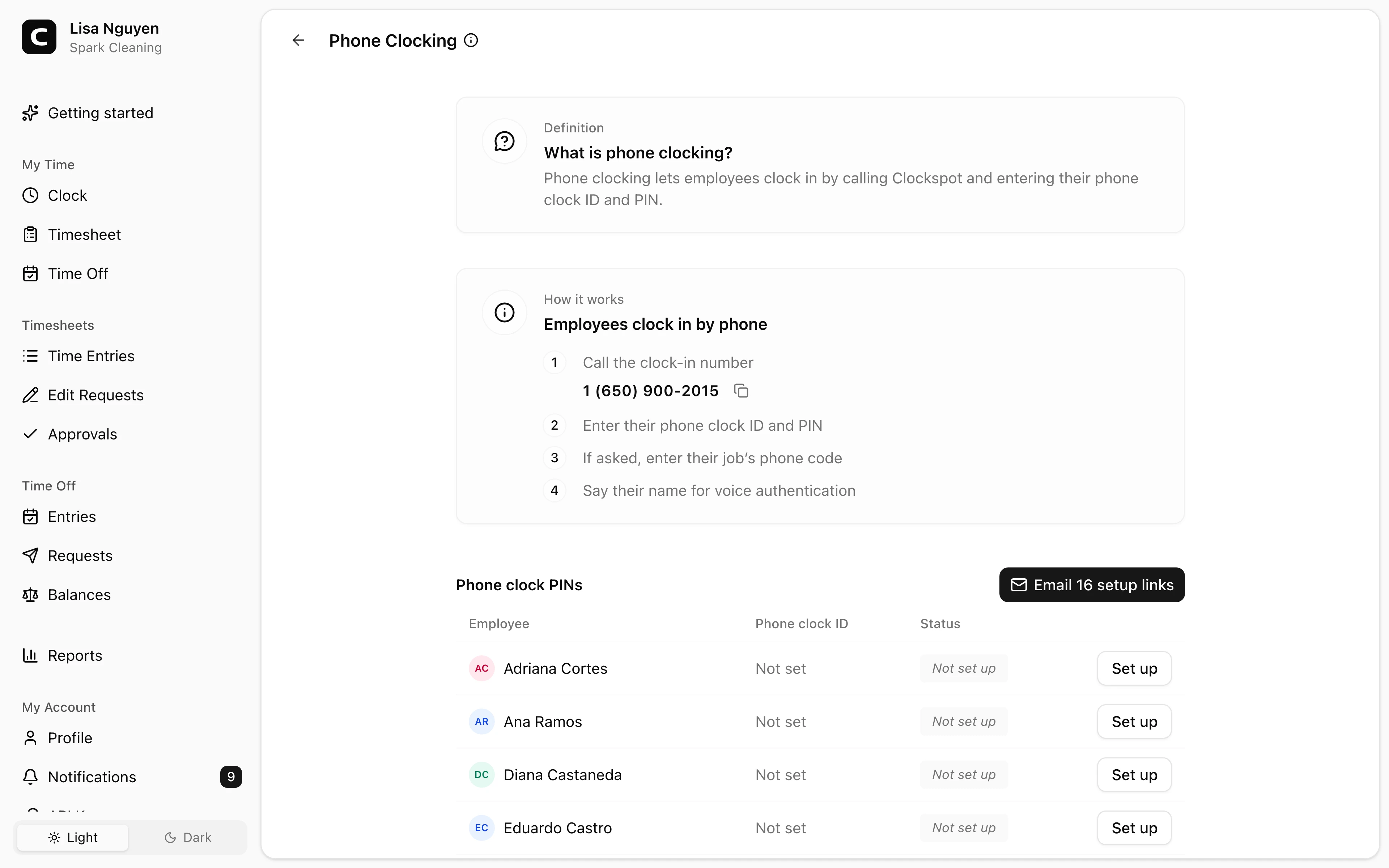
A phone time clock lets an employee call a number, enter an ID and a private PIN, and say their name so the office has a voice record of who clocked in. It works from any landline or cell phone, so it does not need a smartphone, an app, or job-site internet.
This is the option that fits employees with a basic cell phone or only a landline, and crews at sites where data is unreliable. See Clockspot phone time clock for how call-in clocking works, or landline time clock when employees clock in from a fixed phone.
We can show the dial-in setup the office sees: the number employees call, their phone clock IDs, and who still needs a PIN.
Explore the sample account
Spark Cleaning is an example cleaning company in Orange County, California, with crews, client jobs, GPS records, job reports, approvals, and overtime already filled in with sample data.
No login required. Opens in one click.
Clock in from a shared computer or kiosk
If there is a computer at the shop, office, or front desk, employees can clock in there. One shared device can serve everyone on that shift, with each employee entering their own PIN, so no personal phone is involved at all. See time clock kiosk for the shared-device setup.
Clock in from a browser, with no install
Clocking in from a web browser is not the same as installing an app. An employee can open a link and clock in from any phone or computer with internet, and a new hire can start from an emailed invite instead of downloading software first. See time clock without an app for clock-ins that need a browser but never an install.
What to look for
When employees will not all use a smartphone app, the must-haves are:
- Identity without a smartphone. A phone clock ID and PIN, or a kiosk PIN, so the office knows who clocked in without relying on a personal device.
- A record the office can review. Each entry should carry context the manager can check before payroll: the calling number and voice check on phone entries, the PIN on kiosk entries.
- Corrections with a reason. Employees can request a fix and managers approve it, so a missed call-in does not become a guess.
- Payroll-ready export. Approved hours export cleanly, instead of being retyped from notes.
Nice-to-have, not required: GPS and geofencing only apply to clock-ins from an employee's own account on a device that shares location, which is what an employee time clock with GPS relies on. A phone call cannot capture GPS, so do not expect location data from call-in entries.
Best fit and poor fit
This setup fits a business with mixed crews: some employees on a computer or smartphone, others on a basic phone or landline, and some at low-connectivity sites. One system with a phone-call path keeps everyone on the same payroll record.
It is a weaker fit if every employee already clocks in from the same front-desk computer and never works in the field. In that case a single shared device may be all you need, and the phone path just sits unused.
What it does not replace
A phone or browser time clock records hours and makes them reviewable. It does not run payroll, file taxes, or replace a full scheduling, dispatch, or field-service system. Treat it as the time record that has to exist before payroll, not the whole back office.
The rule to carry forward
Do not make a smartphone app the only door. Offer a phone-call clock-in for the people who need it, a shared kiosk where a computer already exists, and a browser link for everyone else, and keep all of it on one payroll-ready record.
For employees without smartphones specifically, see time clock for employees without smartphones. When you are ready, check Clockspot pricing or start a free trial.
Keep reading
How to Track Employee Hours for Payroll
Use this payroll-ready time tracking workflow to capture hours, review exceptions, approve edits, and keep records you can explain later.
Mobile Time Clock: How Employees Clock In From Their Phone
A mobile time clock lets employees clock in from their phone with no app to install. What it captures, when GPS helps, and how to keep mobile hours payroll-ready.
Employee Time Clock With GPS: When Small Businesses Need It
Use GPS time tracking when location affects payroll, job costing, field work, approvals, or trust. Here is what to look for before choosing a GPS time clock.
Photo Time Clock: When to Use Verification Photos
A photo time clock adds verification photos to kiosk clock-ins. Learn what Clockspot captures, what it does not do, and when photo capture helps.
About Clockspot
Clockspot helps small businesses track employee time and keep payroll-ready records. Used in all 50 states since 2007, we focus on getting time and pay right — including the wage-and-hour rules that shape both.
Clockspot lets employees clock in by phone call or browser, with no app to install, and keeps payroll-ready records the office can review. See how Clockspot supports app-free time tracking.