Works from any landline
Employees can call from an office phone, site phone, or other landline when mobile data is not dependable.
Landline time clock
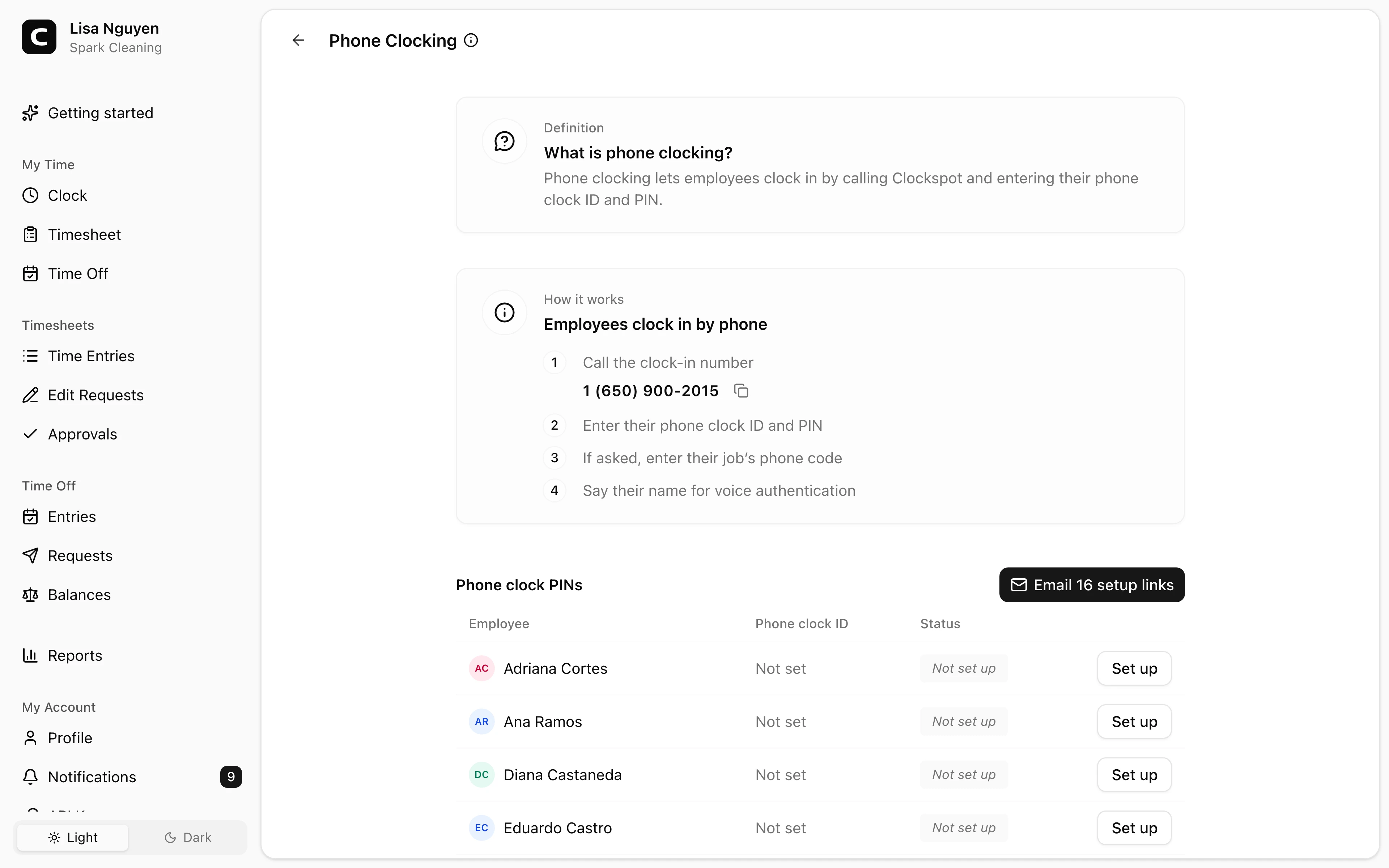
Employees can dial in from any landline or cell phone, enter their phone clock ID and PIN, and say their name for a voice check. It is built for sites where a browser clock-in is not always practical.
Landline or cell phone
Employees can dial in from the phone available at the site.
ID and PIN
Clockspot identifies the employee before saving the entry.
Voice check
A recorded name check helps managers review the entry.
Calling number
Entries show the number that placed the call.
Landline clock-in benefits
Some job sites have low coverage, shared phones, or employees who do not use a smartphone for work. Phone clocking gives them a simple dial-in path.
Useful for job sites, field crews, and shared office phones.
Employees can call from an office phone, site phone, or other landline when mobile data is not dependable.
The same phone clock-in flow works from cell phones when employees do have one available.
Phone clock-ins use an ID, PIN, calling number, and voice check so managers can review who clocked in.
Phone entries become time records managers can review, correct, approve, and export.
Customer story
The phone-in system works perfectly. It has allowed me to manage the time of caretakers in Houston while I am in Austin.
Randy Polk
Estate of Peterson
Employees call, identify themselves, and the entry is saved for manager review.
Dial in
A landline time clock is useful when the phone at the site is more reliable than a browser clock-in.
Identify the employee
Clockspot keeps the phone entry tied to the employee and gives managers context to review before payroll.
Review
Phone clock-ins are not a separate timesheet workflow. They become entries that managers can inspect, correct, approve, and export.
Landline questions
Yes. Employees can call the Clockspot phone clock-in number from a landline, enter their phone clock ID and PIN, and say their name for a voice check.
Yes. The same phone clock-in flow works from landlines and cell phones.
No. Phone clock-ins do not capture GPS. They capture the calling number and a voice check. GPS is available when employees clock in from their own account and share location.
Yes. Assign a phone code to an active job, and employees can enter that job code during the phone clock-in call.
Keep reading
Employees can clock in by phone call, a shared computer, or a browser link, with no app to install. Here is how to keep those hours payroll-ready.
Set up a time clock by deciding who tracks time, when employees clock in, how mistakes are fixed, who approves hours, and how records are kept.
How to reduce buddy punching without turning a payroll problem into a biometric privacy problem.
How employees clock in without a smartphone or an app: phone call-in with a PIN, a shared computer or kiosk, and a browser link. What to look for before you choose.
30 days freeFull accessNo card required