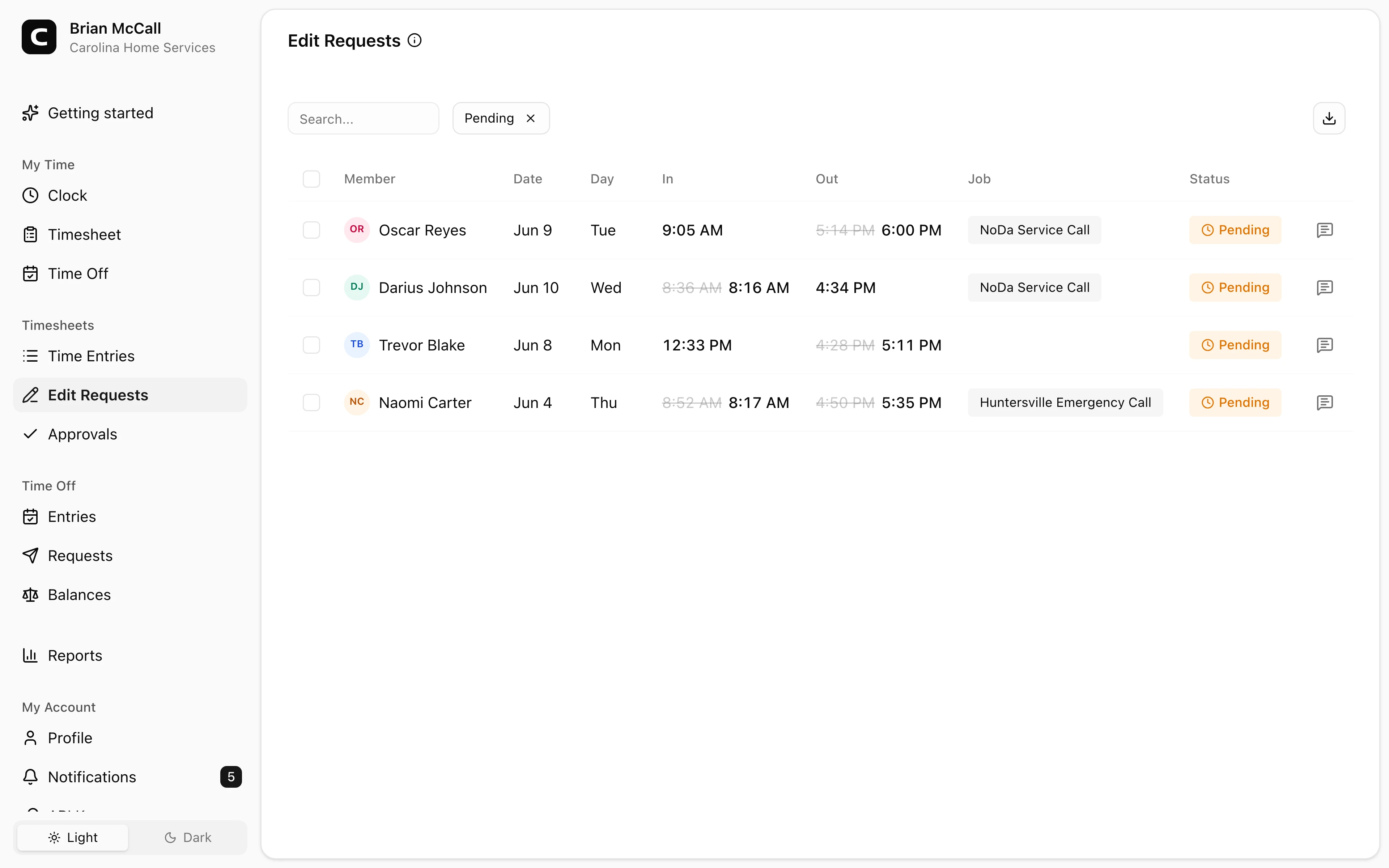
Find incomplete entries
The live clocked-in count and time-entry filters help managers find open shifts before payroll closes.
Missed punch corrections
Find entries that need attention, keep employee correction requests connected to the original time entry, and approve the final time card before reports are exported.
Open shifts
See entries that still need an out time.
Edit requests
Employees can request time or job corrections.
Manager review
Approve or reject correction requests.
Approval trail
Lock reviewed time cards before payroll.
Missed-punch benefits
Missed punches are normal. The important part is keeping the correction explainable: what changed, why it changed, who reviewed it, and whether the period is approved before payroll.
Built for corrections, approvals, and payroll-ready records.
The live clocked-in count and time-entry filters help managers find open shifts before payroll closes.
Employees can ask to correct an existing entry and explain the reason for the change.
Managers can approve or reject edit requests, or cancel approval to reopen an already-approved period.
The original entry, requested change, reason, and approval state stay part of the time record.
Clockspot gives managers a clear path from finding the issue to approving the final record.
Find the issue
Missed punches usually show up as open shifts, unusual totals, wrong jobs, or employee requests. Managers can review them before payroll starts.
Review corrections
A correction is easier to trust when the manager can see the old value, the requested value, and the reason.
Close payroll cleanly
Once the entry is corrected, managers can approve the timesheet so payroll reports are based on reviewed records.
Missed-punch questions
Employees request edits. A manager reviews the request and decides whether to approve or reject it. Managers can also edit entries directly when they have permission.
An edit request changes an existing entry. If the employee never recorded the shift at all, a manager can add the time entry.
Managers can cancel the approval, edit the entry, and approve again. Employees can also submit edit requests for approved timesheets.
No. Clockspot keeps the correction workflow and record together. Your business still decides how to handle policies, payroll rules, and legal requirements.
Keep reading
Correct the missed clock-out before payroll, keep the reason for the edit, and approve the final time instead of guessing.
A quick pre-payroll check for missing punches, overtime risk, manual edits, approvals, and the records behind the final hours.
A time card audit trail shows punches, edits, reasons, approvals, late corrections, and the records behind payroll totals.
Handle caregiver missed punches by keeping visit context, correction reasons, supervisor review, and payroll-ready time records together.
30 days freeFull accessNo card required